Virtualization
Our Managed Virtualization allows organizations to leverage the benefits of virtualization without the knowledge investment, which can be associated with managing such systems.
Talk to an expert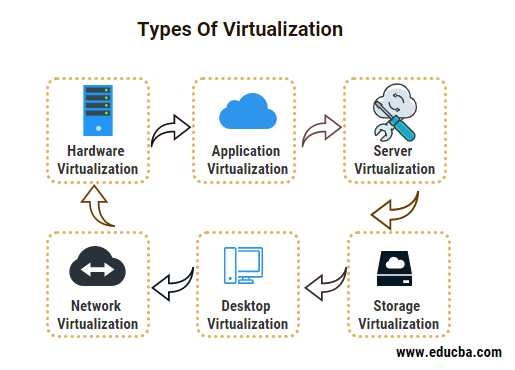
Switching to virtualization helps in controlling workloads across data centers in addition to reducing energy consumption and IT infrastructure.
Our Virtualization Consulting Services deliver end-to-end solutions with its expertise on market-leading platforms such as VMware. With proven excellence, we can help organizations in switching over to a virtualized IT environment and meet the demand for more efficient IT operations. Virtualization also underpins many of our cloud and on-premises infrastructure services, letting you run more workloads on the same physical hardware.
Virtualization is a good fit for organizations that want to consolidate aging hardware, reduce data center footprint, support remote or hybrid workforces through virtual desktops, or improve disaster recovery by making systems easier to back up and restore as portable virtual machines.
Frequently Asked Questions
What is the difference between server and desktop virtualization?
Server virtualization partitions one physical server into multiple independent virtual servers. Desktop virtualization (VDI) instead separates a user's desktop environment from their physical device, hosting it centrally so it can be accessed remotely.
Which virtualization platforms do you support?
Our consulting services are built around market-leading platforms such as VMware, and we tailor the approach to the platforms already in use in your environment.
Is virtualization only useful for large enterprises?
No. Organizations of many sizes use virtualization to make better use of existing hardware, simplify IT management and improve resilience, though the right approach depends on your current infrastructure and goals.
Our portfolio of Consulting Services includes:
-
 Virtualization: Here, the applications get virtualized and are streamed from a server to the end user’s device.
 -
 Desktop Virtualization: It is a method that separates a computer’s desktop environment from the physical computer. It is mostly used in the data center, where personalized desktop images for each user are hosted on a data center server.
 -
 Hardware Virtualization: refers to the creation of virtual (as opposed to concrete) versions of computers and operating systems. It aims to run different operating systems on the same hardware and lets more than one user to use the processor simultaneously.
 -
 Network Virtualization: This refers to the method of combining the available resources in a network by dividing the available bandwidth into independent channels, each of which can be assigned or reassigned to a particular server or device in real time.
 -
 System (OS) Virtualization: It enables organizations to have a single server that can run multiple OS’ instead of having a dedicated server for each OS.
 -
 Server Virtualization: It is a method of partitioning one physical server into numerous virtual servers, each of which run its own operating system, applications and functions as an independent server.
 -
 Storage Virtualization: It is the process of grouping physical storage from multiple network storage devices so that it performs as if it is on one storage device.